
How It Works
Everything you need to know about getting your audit, understanding your results, and unlocking actionable insights for your Amazon advertising account.
Before You Upload: Getting Your Amazon Reports
To get started with your free Amazon Ads audit, you'll need to download reports directly from your Amazon Seller account and Ad Console. Here's exactly what you need and how to get it:
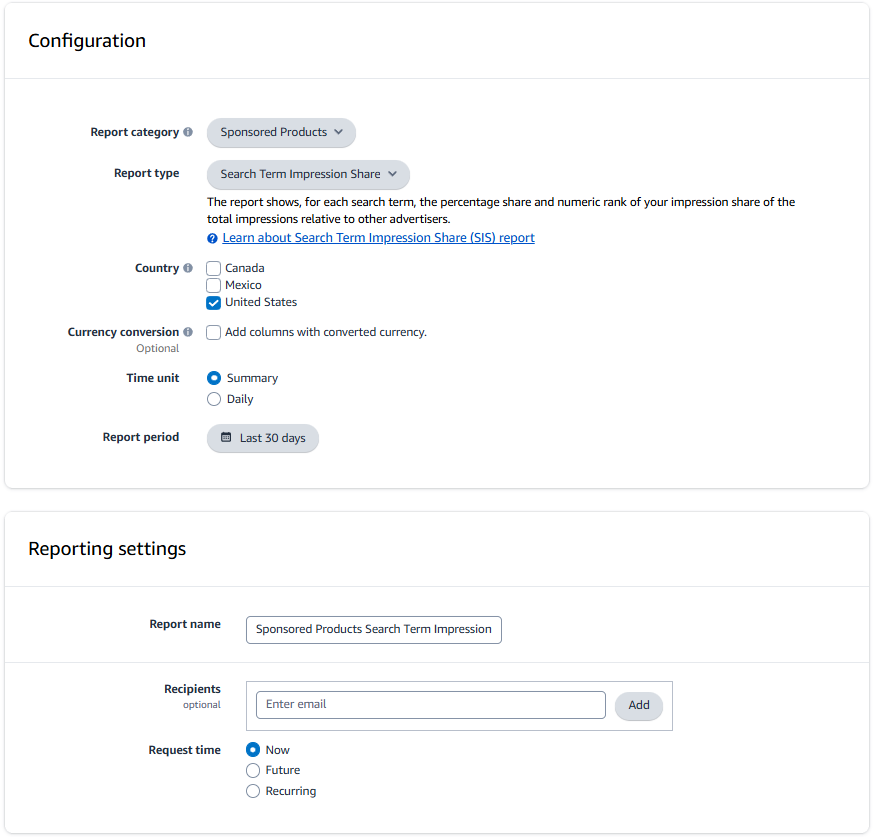
Required: Sponsored Products Search Term Impression Share Report
This is the core report that powers your audit. It contains search term-level performance data with impression share metrics for all your Sponsored Products campaigns.
Navigation Path:
Amazon Ads Console → Measurement & Reporting → Sponsored Ads Reports → Create Report → Update Configuration To Match Image
Step-by-Step Instructions:
- Step 1: Go to Amazon Ads Console
- Step 2: Navigate to Measurement & Reporting → Sponsored Ads Reports
- Step 3: Click Create Report
- Step 4: Update Configuration to match the screenshot (see image below)
- Step 5: Choose date range
Up to you (If using tool for first time, we recommend the last 65 days)
- Step 6: Download the report as .xlsx or .csv
Upload it exactly as exported - no modifications needed
Configuration Screenshot:
Optional: Sponsored Brands Search Term Report
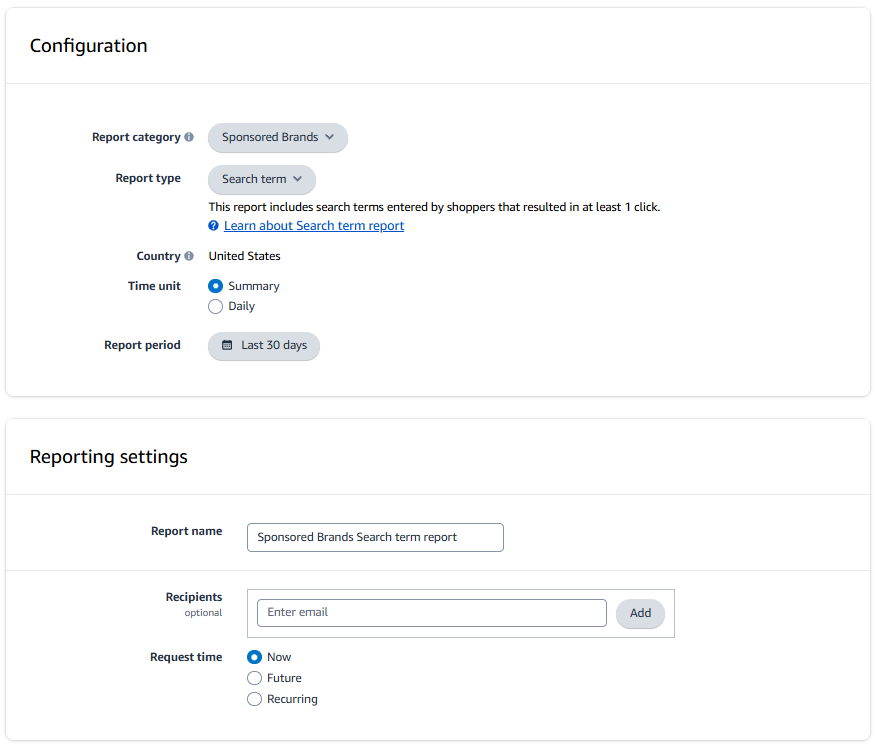
If you're running Sponsored Brands campaigns, upload this report to get a complete view of your account performance across both SP and SB.
Navigation Path:
Amazon Ads Console → Measurement & Reporting → Sponsored Ads Reports → Create Report → Update Configuration To Match Image
Step-by-Step Instructions:
- Step 1: Go to Amazon Ads Console
- Step 2: Navigate to Measurement & Reporting → Sponsored Ads Reports
- Step 3: Click Create Report
- Step 4: Update Configuration to match the screenshot (see image below)
- Step 5: Choose date range
Up to you (If using tool for first time, we recommend the last 65 days)
- Step 6: Download the report as .xlsx or .csv
Including SB data gives you a holistic account view and helps identify cross-campaign optimization opportunities
Configuration Screenshot:
Required: Brand Analytics Search Query Performance Report (Unlocks Incremental ROI)
This report is the key to unlocking incremental ROI estimates. It shows organic market share for your branded keywords, which we use to calculate how much of your ad-attributed sales would have happened anyway.
Navigation Path:
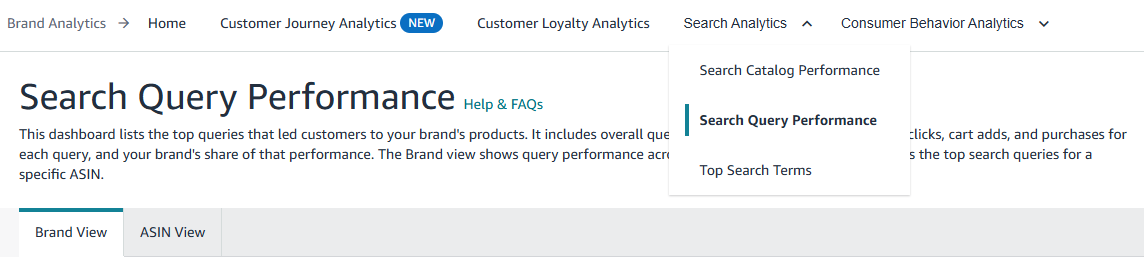
Seller Central → Brands → Brand Analytics → Search Analytics → Search Query Performance
Step-by-Step Instructions:
- Step 1: Go to Seller Central
- Step 2: Navigate to Brands → Brand Analytics → Search Analytics
- Step 3: Click on Search Query Performance
- Step 4: Choose date range
Generally we recommend doing the last full quarter, unless you want to match up the date ranges between this report and your ad reports perfectly
- Step 5: Select Simple View and Download the report
- Important Note:
The Brand Query Report only covers keyword searches, not ASIN searches. ASIN-level incrementality cannot be calculated from this data, only estimated based on overall incrementality.
Configuration Screenshot:
After Upload: Understanding Your Results
Once you upload your reports, you'll get instant insights into your account health. Here's what each metric means and how to interpret it:
Account Health Score (0-100)
Your overall account health score is calculated based on three key pillars:
- Estimated Wasted Spend (40 points)
Lower wasted spend = higher score. We identify patterns of spend with zero sales or poor performance.
- Profitability (35 points)
Based on your estimated margin and account-level incremental ROI. Accounts operating profitably score higher, if that is the goal.
- Brand vs. Non-Brand Balance (25 points)
Accounts with a healthy mix of non-branded keyword spend (driving new demand) score better than those over-reliant on branded terms.
Score Interpretation:
- 80-100: Excellent - Your account is well-optimized with minimal wasted spend
- 65-79: Good - Some optimization opportunities exist
- 50-64: Needs Improvement - Significant wasted spend or optimization issues detected
- Below 50: Critical Issues - Major problems requiring immediate attention
Estimated Wasted Spend
This is spend that's likely not driving incremental value. We identify wasted spend through advanced search term pattern analysis that detects spend with a high likelihood of waste:
- Zero-sales terms
Search terms with statistically significant spend but zero conversions - clear waste.
- Low incremental ROI patterns
Terms with poor incremental performance (when Brand Query Report is provided) that fall below your profitability threshold.
- Deduplicated waste
When multiple similar terms show waste, we identify the most efficient negative keyword to block them all. If you have a large number of similar terms, this can be a significant savings.
Estimated Incremental ROI
This metric shows the true incremental return on your ad spend, adjusted for organic market share.
Unlike platform ROAS (which attributes all sales to ads), incremental ROAS answers: "How much additional revenue did these ads actually drive that wouldn't have happened organically?"
- Account-Level Incremental ROAS
The overall incremental return across your entire account. Compare this to your platform ROAS to see the gap.
- Branded vs. Non-Branded Breakdown
See how branded keywords (typically lower incrementality) compare to non-branded and competitor terms (typically higher incrementality).
- Search Term Level
In the full Excel report, you'll see incremental ROAS for individual search terms, helping you identify which keywords truly drive new demand.
Top Growth Opportunities & Wasted Spend Patterns
We surface the most impactful opportunities for optimization:
- Est. Wasted Spend
Top search term patterns with the highest wasted spend. These are prime candidates for negative keywords or bid reductions.
- Top Growth Opportunities
Terms with strong incremental performance and room to scale (e.g., high impression share available). Consider increasing bids or budgets here.
- Search Term Pattern Analysis
We group similar search terms together to identify broader patterns. This allows us to surface insights quicker than manually reviewing individual customer search terms.
The Full Paid Audit ($99)
While the free audit gives you instant insights, the paid audit ($99) is where you get a decade of Amazon advertising experience concentrated into a single, comprehensive report. This is the deep dive that turns insights into action.
What's Included in the Paid Audit
The paid audit includes everything from the free report, plus:
- Complete Search Term Analysis
Every search term from your reports analyzed individually with spend, sales, ROAS, ACOS, and incremental metrics (when data is available).
- Advanced Search Term Pattern Detection
Deep analysis of search term patterns you've probably never reviewed before. We surface hidden opportunities and waste patterns that aren't obvious at the individual term level.
- Prioritized Recommendations
Negative keyword candidates ranked by impact, with exact wasted spend amounts. Bid reduction recommendations with precise percentages to reach profitability.
- Spend Reallocation Strategy
Specific recommendations on where to decrease spend (and by how much) and where to increase spend for maximum ROI.
- Cross-Campaign Insights
When both SP and SB reports are provided, analysis of how campaigns work together and opportunities for cross-campaign optimization.
- Category-Level Deep Dives
Detailed breakdowns of branded keywords, branded ASINs, competitor ASINs, and non-brand keywords with specific optimization strategies for each.
What to Expect
The paid audit is designed to be immediately actionable:
- Ready to Implement
All recommendations include exact values - negative keywords to add, bid reductions with percentages, and spend adjustments with dollar amounts.
- Prioritized by Impact
Recommendations are sorted by potential savings or revenue impact, so you know where to start for maximum ROI.
- Comprehensive Coverage
The report analyzes your entire account holistically, identifying patterns and opportunities you might miss when looking at individual campaigns.
- Industry Expertise
Built on a decade of Amazon advertising experience - the insights go beyond what most tools on the market can provide, at this cost and speed.
Who Should Get the Paid Audit?
The paid audit is ideal if:
- You want a complete action plan
You're ready to implement optimizations and need specific, prioritized recommendations.
- You want to understand your account deeply
Beyond just fixing waste, you want to understand why certain patterns exist and how to build better strategies.
- You need to justify changes to stakeholders
The detailed analysis provides data-backed rationale for budget shifts and optimization decisions.
The free audit gives you the health score and high-level insights. The paid audit gives you the complete roadmap to optimization.